


Calibration Date on Versiv Module
Only the measurement modules (DSX-5000, DSX-8000, CertiFiber Pro, OptiFiber Pro) used with Versiv and Versiv2 CableAnalyzer are eligible for recommended annual factory calibration at the Service Center. The Versiv and Versiv2 Main and Remote units do not require factory calibration.
As long as you are keeping the Versiv Main and Versiv Remote updated with the latest software version, and there are no hardware issues with them, they do not need to be sent to the Service Center annually. There is also no annual calibration available or needed for any of the accessory adapters (Permanent Link and Channel, DSX-COAX, DSX-PCxx patch cord adapters) or FI-1000 Fiber Inspection camera.
How do I find my calibration due date?
You can connect any of the modules to the Versiv mainframe and check Version Information to interrogate the module. The module is considered due for factory calibration one year beyond the stated Calibration Date or Calibration Start Date.
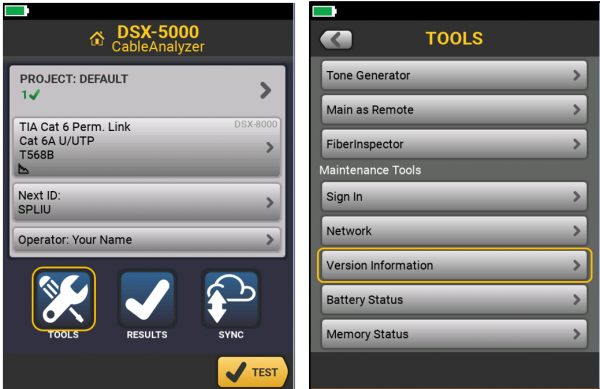
From the Home screen with the module attached, Tap TOOLS > Version Information
Next, tap Module
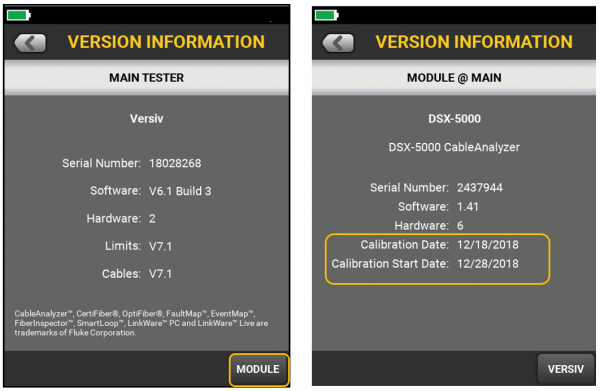
Notes:
It is normal for the Software and Hardware versions on the MODULE @ MAIN screen NOT to match the Software and Hardware versions on the MAIN TESTER screen, even after a software update. As long as you are updating the Versiv Main and Versiv Remote when a new update is available, any measurement modules will be updated automatically when they are connected to the test set. The example above does not indicate that the DSX-5000 module needs an update.
If the Versiv Remote is connected with Permanent link adapter and Channel adapter (copper set refence connections), this method can also be used to interrogate the module on the Remote.
In the case of CertiFiber Pro modules, you can use this method to interrogate the Remote module when you connect Versiv Main and Remote over fiber test reference cord set reference connections.
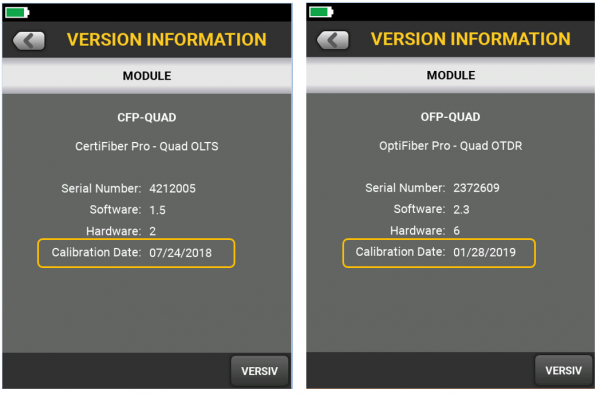
In the MODULE screens below, the Versiv Main was running version 6.1 Build 3. Calibration on these modules is considered due one year beyond the stated Calibration Date.
CFP-QUAD and OFP-QUAD Examples:
LinkWare PC
During the import process via USB cable to download results from the tester, LinkWare PC gives a warning 60 days and 45 days before the calibration expires. Thirty days before expiration, a pop-up dialog warning shows each time LinkWare PC imports data from the tester.
To make sure that the modules operate within the published specifications for accuracy, we recommend customers have them calibrated at a Fluke Networks authorized Service Center every 12 months.
If the Versiv module was used for the first time within 6 months after it was calibrated during manufacturing, Calibration Start Date is displayed below Calibration Date. This is the date the module was first used. This is typical for new modules which have never been set to the Service Center for factory calibration.
If the first use was more than 6 months after calibration, the Calibration Start Date is the date the module was calibrated, plus 6 months. For example, if the module was manufactured and calibrated on February 1st, 2018, but not used to run an autotest until October 1st, 2018, the Calibration Start Date is August 1st, 2018. Calibration would be considered due by August 1st, 2019 for this module.
The module’s calibration expires 12 months after the Calibration Date or the Calibration Start Date.
LinkWare Live
LinkWare Live provides periodic updates via email notifications to Organization Owner, Manager, and Admin Roles. The Asset Tracking feature can also be used to determine calibration status of modules used in test results that are SYNCed to Projects and Subprojects in the users’ LinkWare Live Organizations.
One caveat to relying on LinkWare Live for module calibration status is that LinkWare Live will only track serial numbers which were included in results that were SYNCed to your LinkWare Live Organization.
Notifications and and Asset Status warns when the calibration status is overdue.
If the date is within 60 of the recommended one year calibration interval, a warning “Nearing recommended calibration date of XX/XX/XXXX” will be displayed next to the serial number of the asset.